
Building a sampler with 2.7 milliseconds to spare
Sixteen pads inside my Windows 98 desktop. Rust made the engine 2.3 times faster, but keeping the audio running took more than that.
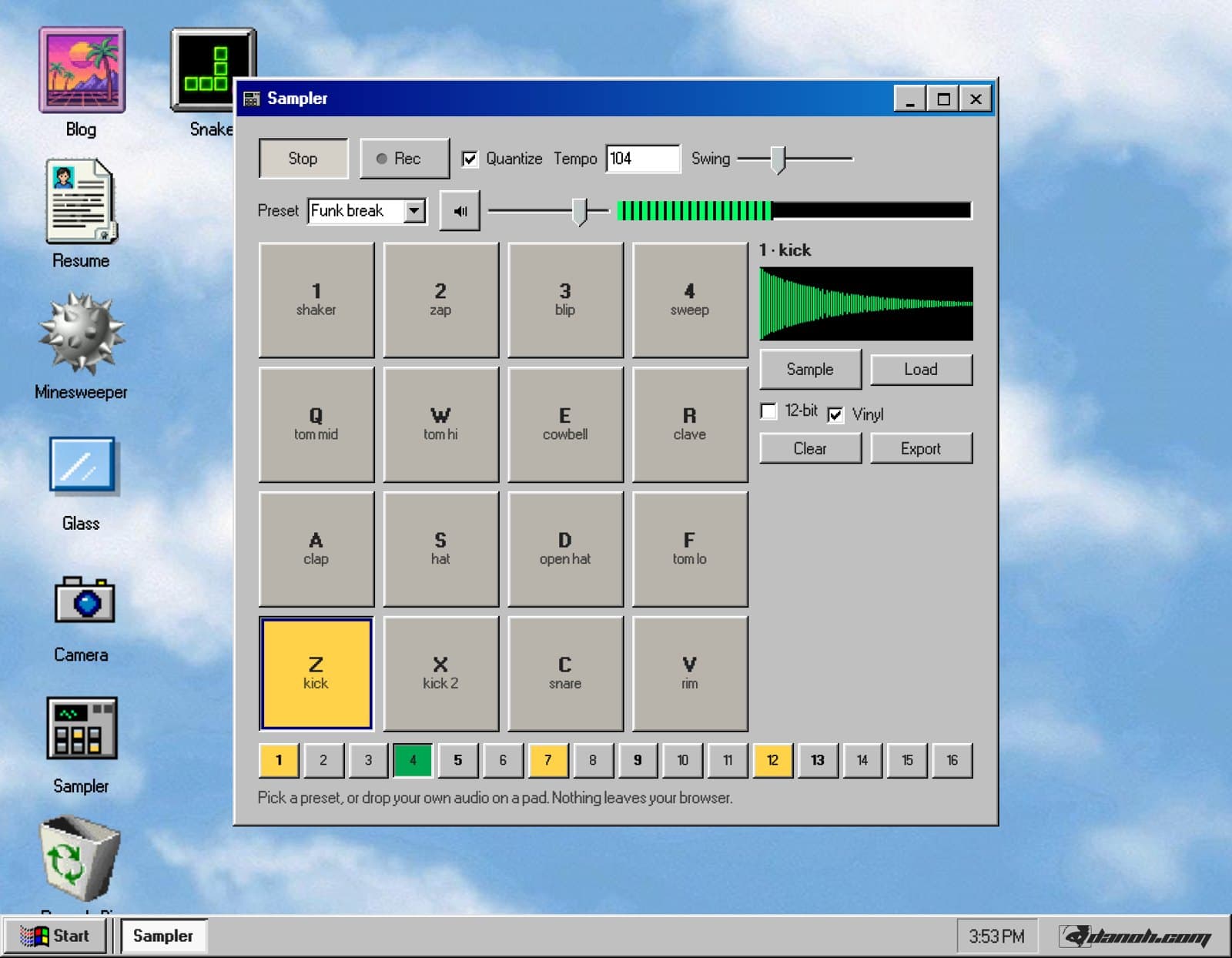
I built a sampler for my desktop. You can play drums, record something through your microphone, and turn it into a loop without leaving the browser.
Hold Sample to record into a pad. Arm Rec to put your hits into a sixteen-step pattern. Export the loop and it shows up as a WAV in My Samples, where you can open it through Explorer.
Getting those pieces to work together was satisfying. Getting them to keep playing while the rest of the page was busy was the more interesting problem.
A deadline every 2.7 milliseconds
The sampler processes audio in an AudioWorklet, away from the main thread. It receives 128 frames at a time: roughly 2.67 milliseconds of audio at 48 kHz, or 2.9 milliseconds at 44.1 kHz.
The engine has to fill each block in time for playback. Miss that deadline and you can hear a click or a dropout.
That changes how you write the code. A slow render might make a window feel sluggish. With audio, even a brief interruption can be obvious. I wanted the sampler to keep time while you dragged windows around or the page had other work to do.
An 18 KB Rust engine
The engine is a Rust crate with no dependencies, compiled to WebAssembly and instantiated inside the worklet. The compiled module is 18,899 bytes, and compiling it takes under two milliseconds.
I made two decisions to keep the audio processing predictable.
Allocate the memory up front. The module reserves about eighteen megabytes for the pads during initialization, using a bump allocator. Once playback starts, process() works with memory it already has. It does not allocate while rendering audio.
Generate the starting kit. All sixteen sounds are synthesized in Rust when the sampler opens. The kicks and toms use swept sine waves, the hats and clap use filtered noise, and the cowbell uses two detuned square waves.
Generating the kit takes about six milliseconds. It also meant I could ship the sampler without any audio files.
Getting the 12-bit sound
The 12-bit switch is probably my favorite part.
Its behavior draws on Patina, Dave Locke's MIT-licensed, clean-room study of classic hardware samplers. I used its documented behavior as a reference for three parts of the signal chain:
- Linear interpolation when changing pitch, following the Akai S900's approach to playing samples at different rates.
- A one-pole low-pass filter that follows the pitch ratio. Pitching a sample up also raises the cutoff, changing its tone along with its speed.
- Sample-rate reduction with zero-order hold, followed by 12-bit quantization. The converter holds each value until the next update, then reduces the amplitude resolution.
Together, those do more to the sound than reducing the bit depth alone.
This is an approximation based on published behavior. The source calls out the simplifications: filtering happens per voice so it can follow each voice's pitch, while the converter processes the combined mix.
Rust was faster. Both engines were fast enough.
I kept a JavaScript version of the engine for testing. Both versions render the same scripted pattern, and the output has to agree within 1e-6, sample for sample.
That checks whether the implementations agree. It also gave me a useful performance comparison.
I rendered the same pattern offline through each engine, with five voices per step and the converter enabled:
| Measurement | Rust | JavaScript |
|---|---|---|
| 30 seconds of audio, no CPU throttling | 55 ms | 126 ms |
| 20 seconds of audio, 6x CPU throttling | 229 ms | 517 ms |
| Average processing time as a share of a 2.9 ms block, 6x throttling | 1.1% | 2.6% |
Rust was about 2.3 times faster in these tests. But both engines had plenty of room left in the processing budget.
That was useful to know. Throughput alone was not a compelling reason to choose Rust here.
I still preferred its control over memory allocation. Keeping allocation and garbage collection out of the engine's processing path removes one source of unpredictable pauses. An offline benchmark does not establish how often playback will glitch, though. These numbers show that both engines can do the arithmetic quickly enough.
Keeping time inside the worklet
The next test was closer to what I actually cared about.
While a pattern played, I blocked the main thread with a 300-millisecond busy loop. I wanted to see what would happen when the page was occupied by something like a heavy render or a large JSON parse.
Both engines completed every audio block they were due during the test. A setTimeout scheduled to fire 50 milliseconds into the stall fired about 250 milliseconds late.
The audio kept moving while the page's timer waited.
That is why the sequencer counts samples inside the worklet. Its timing comes from the audio it is producing, rather than a main-thread timer telling it when to play the next step.
Rust gave me more headroom. Moving audio processing and sequencing into the worklet let playback continue while the main thread was blocked.
Two things that cost me an afternoon
The first was getting the WebAssembly module into the worklet.
I initially tried sending a compiled WebAssembly.Module. In the setup I was testing, it never arrived, leaving the sampler waiting for an initialization handshake that did not finish.
Sending the bytes and compiling inside the worklet fixed it:
// Main thread
node.port.postMessage({ type: "init", bytes }, [bytes]);

// Worklet
const module = new WebAssembly.Module(msg.bytes);
this.wasm = new WebAssembly.Instance(module, {}).exports;
The second was assuming the worklet had the same utilities I used elsewhere in the browser.
I ran into missing APIs, including fetch, TextDecoder, and performance.now. That last one broke my plan to collect a per-block timing histogram.
I moved the offline throughput measurements to the main thread and kept the playback test separate. They answer different questions: how quickly the engine can render audio, and whether it keeps working while the page is busy.
Make a loop
The easiest way to start is with one of the six presets. Pick House or Boom bap and it loads a pattern, sets the tempo, and configures the converter.
From there, play over it. Touch near the top of a pad for a softer hit, or near the bottom for a louder one. You can play multiple pads at once, or use the keyboard grid from ZXCV up to 1234. On a phone, the sampler fills the screen, and the pads buzz where the device supports it.
To use your own sounds, drop a file onto a pad, press Load, or hold Sample to record through your microphone. Each pad holds up to six seconds. Files are decoded locally, and microphone capture stops when you release Sample. Your recordings stay in your browser.
There is also a Vinyl switch next to 12-bit. It adds low-level hiss, occasional crackle, and a little drive to soften the peaks. I like what it does to the synthesized kit, especially with the converter on.
When you have a loop you like, export it. The WAV appears in My Samples. Double-click it in Explorer and it opens back in the sampler, ready to use on a pad.
That little round trip is one of my favorite parts. It makes the desktop feel like a place where the things I build belong together.
Open the sampler, pick a preset, and try the 12-bit switch while it plays.
© 2026 Daniel Oh · danoh.com/blog/audio-thread